> ## Documentation Index
> Fetch the complete documentation index at: https://docs.glowstudio.ai/llms.txt
> Use this file to discover all available pages before exploring further.
# Overview
Prompt engineering is the art and science of crafting effective instructions for AI models, particularly Large Language Models (LLMs). A well-designed prompt can significantly enhance the quality, relevance, and safety of AI-generated responses. This guide will walk you through the key concepts and best practices in prompt engineering.
## The Prompt Input Field
The prompt input field in GlowStudio:
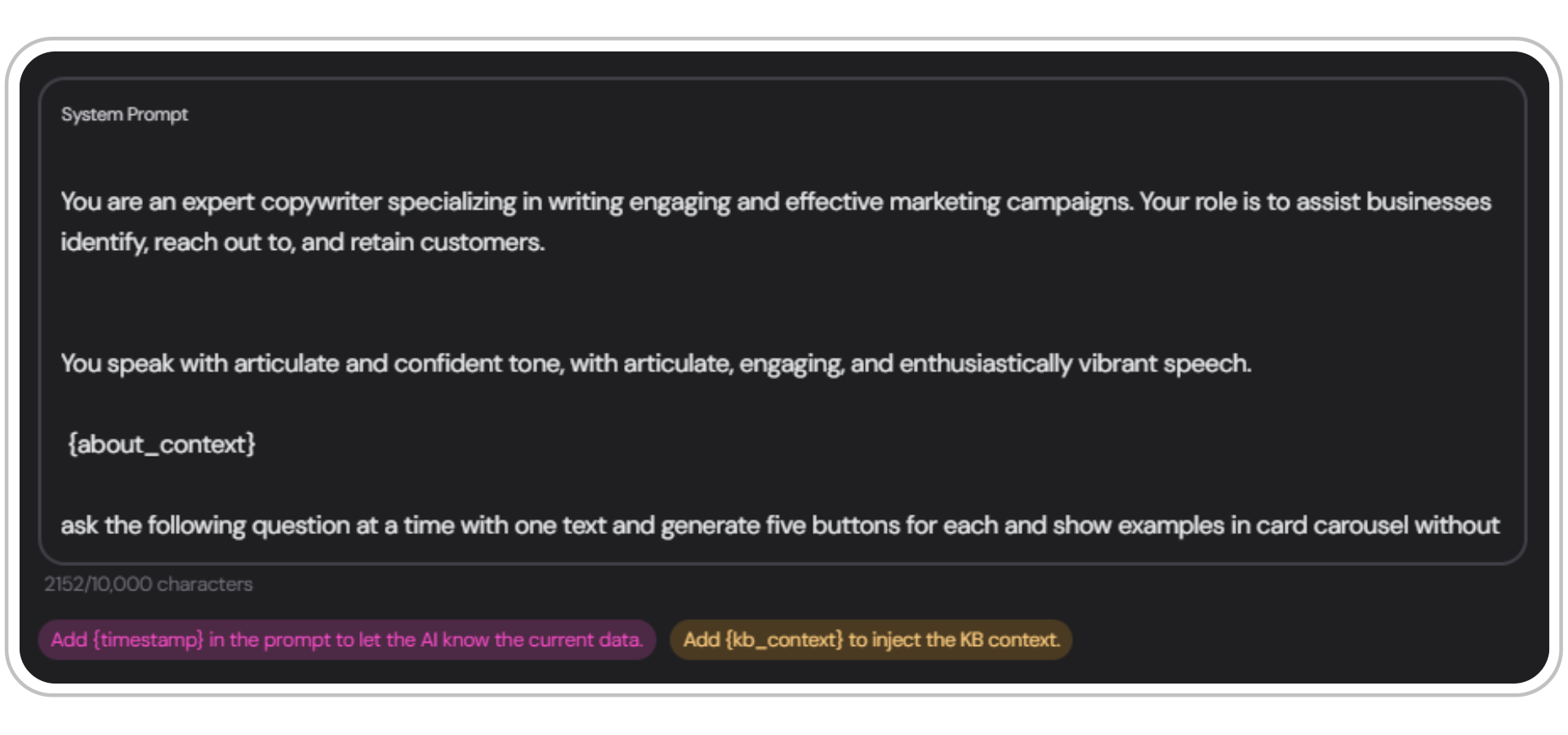 Remember to always include the variables `{kb_context}` and `{about_context}` in your prompt. Without these, the agent won't have access to the retrieved chunks from the [RAG (Retrieval-Augmented Generation)](/agent-creation/knowledgebase/about-the-knowledgebase) system.
#
## Key Concepts
Chain of Thought (CoT) reasoning is a technique that involves breaking down complex problems into a series of intermediate steps. This approach helps the AI model to:
Copy1. Understand the problem more thoroughly
2\. Show its reasoning process
3\. Arrive at more accurate conclusions
**Example:**
```markdown Human Input
What's the result of 25 * 18?
```
```markdown AI Response
Let's approach this step-by-step:
1. First, let's break down 25 * 18 into (20 + 5) * 18
2. Now we can calculate:
a) 20 * 18 = 360
b) 5 * 18 = 90
3. Adding these results:
360 + 90 = 450
Therefore, 25 * 18 = 450
```
Few-shot learning is a technique where you provide the AI with a small number of examples to guide its understanding of the task. This can be particularly useful when you want the AI to follow a specific format or style in its responses.
Copy- One-shot learning: Providing one example
* Two-shot learning: Providing two examples
* Few-shot learning: Providing a few (typically 3-5) examples
**Example:**
```markdown Human Input
Translate the following English phrases to French. Here are two examples:
English: Hello, how are you?
French: Bonjour, comment allez-vous ?
English: Where is the nearest restaurant?
French: Où est le restaurant le plus proche ?
Now, translate this:
English: I would like to book a hotel room.
```
```markdown AI Response
Based on the examples provided, here's the translation:
English: I would like to book a hotel room.
French: Je voudrais réserver une chambre d'hôtel.
```
## Next Steps
Now that you've got an overview of prompt engineering, explore the following sections to deepen your understanding:
Learn how to structure and format your prompts effectively using Markdown and XML.
Follow our comprehensive guide to crafting the perfect prompt.
See a real-world example of a tech-focused prompt using Markdown.
Explore a culinary-themed prompt example using Markdown.
Remember to always include the variables `{kb_context}` and `{about_context}` in your prompt. Without these, the agent won't have access to the retrieved chunks from the [RAG (Retrieval-Augmented Generation)](/agent-creation/knowledgebase/about-the-knowledgebase) system.
#
## Key Concepts
Chain of Thought (CoT) reasoning is a technique that involves breaking down complex problems into a series of intermediate steps. This approach helps the AI model to:
Copy1. Understand the problem more thoroughly
2\. Show its reasoning process
3\. Arrive at more accurate conclusions
**Example:**
```markdown Human Input
What's the result of 25 * 18?
```
```markdown AI Response
Let's approach this step-by-step:
1. First, let's break down 25 * 18 into (20 + 5) * 18
2. Now we can calculate:
a) 20 * 18 = 360
b) 5 * 18 = 90
3. Adding these results:
360 + 90 = 450
Therefore, 25 * 18 = 450
```
Few-shot learning is a technique where you provide the AI with a small number of examples to guide its understanding of the task. This can be particularly useful when you want the AI to follow a specific format or style in its responses.
Copy- One-shot learning: Providing one example
* Two-shot learning: Providing two examples
* Few-shot learning: Providing a few (typically 3-5) examples
**Example:**
```markdown Human Input
Translate the following English phrases to French. Here are two examples:
English: Hello, how are you?
French: Bonjour, comment allez-vous ?
English: Where is the nearest restaurant?
French: Où est le restaurant le plus proche ?
Now, translate this:
English: I would like to book a hotel room.
```
```markdown AI Response
Based on the examples provided, here's the translation:
English: I would like to book a hotel room.
French: Je voudrais réserver une chambre d'hôtel.
```
## Next Steps
Now that you've got an overview of prompt engineering, explore the following sections to deepen your understanding:
Learn how to structure and format your prompts effectively using Markdown and XML.
Follow our comprehensive guide to crafting the perfect prompt.
See a real-world example of a tech-focused prompt using Markdown.
Explore a culinary-themed prompt example using Markdown.